
Smarkets built its reputation on two things: low commission and a clean, modern interface. Both of those translate directly to the mobile app, which puts the full betting exchange in your pocket with the same 2% commission, the same Trade Out functionality, and the same peer-to-peer markets you get on the desktop platform. For exchange bettors and matched bettors who need to act fast, an app that works properly is not a luxury. It is the difference between hitting a price and watching it drift.
The Smarkets app is genuinely well regarded, and that is not something you can say about most betting apps. The iOS version carries a 4.8-star rating from over 4,600 reviews, which is exceptional by any measure and puts it comfortably ahead of most competitors in the exchange and traditional bookmaker space. The Android version scores lower but is still solid. The design is modern and the core exchange functionality works. That said, there are honest trade-offs: some users report performance issues under load, the odds depth display is limited on mobile compared to desktop, and the app burns through battery faster than you might expect. This review covers all of it.
If you already use Smarkets on desktop, the app is the same account, the same balance and the same markets. There is nothing to re-register and your COMMFREE promo code applies regardless of whether you bet on the website or through the app. If you are new to Smarkets entirely and have arrived here first, this page tells you what the app does, how it performs and whether it suits how you trade, with links to the full platform review and promo code breakdown elsewhere on the site.
| Feature | Detail |
|---|---|
| Available on | iOS (App Store) and Android (Google Play) |
| Cost | Free |
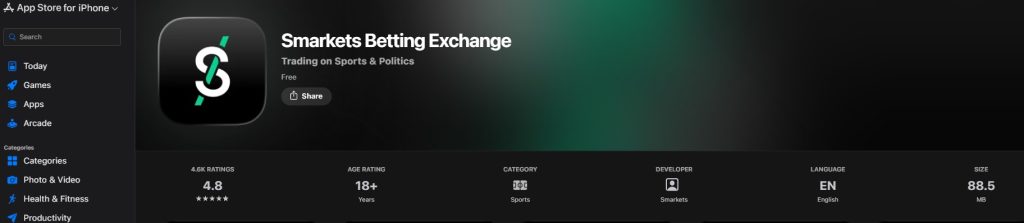
| iOS rating | 4.8 stars (4,600+ reviews) |
| iOS requirement | iOS 13.4 or later |
| App size | Approximately 88.5 MB (iOS) |
| Product | Betting exchange — sports, politics, entertainment |
| Commission | 2% on net winnings (0% for 60 days with code COMMFREE) |
| Key feature | Trade Out — manage positions in-play |
| Live streaming | Horse racing |
| Biometric login | Fingerprint / Face ID |
| Two-factor authentication | Yes |
| Matched betting | Built-in hub with lay calculator |
| Operator | Smarkets Limited |
| Licences | UK Gambling Commission + Malta Gaming Authority |
How to download the Smarkets app
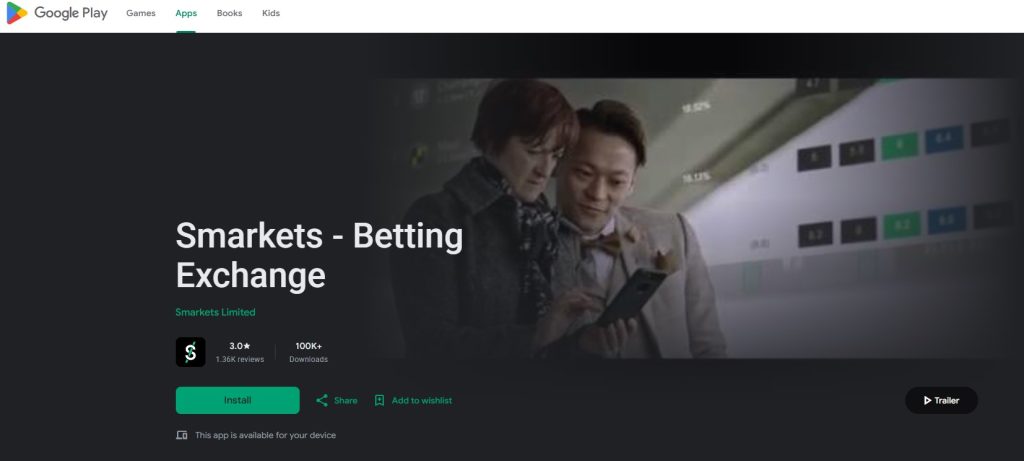
The app is available from both official stores and the download is quick — around 88.5 MB on iOS, so it is not eating into your storage the way some trading platforms do. As with any betting app, stick to the official App Store and Google Play Store. There is no reason to sideload anything, and doing so only introduces unnecessary risk.
How to download the Smarkets iPhone app
- Open the Apple App Store on your device.
- Search for “Smarkets Betting Exchange” — the official app from Smarkets Limited will be the top result.
- Tap Get and authorise the download with Face ID, Touch ID or your Apple ID password.
- Once installed, open the app and either log in with your existing Smarkets account or tap Join to register.
The app runs on iOS 13.4 or later, so any iPhone from the 6s onwards is covered. It works on iPad too, though the interface is designed primarily for phone-sized screens.
How to download the Smarkets Android app
- Open the Google Play Store on your Android device.
- Search for “Smarkets – Betting Exchange” and select the official listing from Smarkets Limited.
- Tap Install and wait for the download to complete.
- Open the app and log in or register a new account.
Android requirements are less tightly specified, but any reasonably modern device running a recent version of Android will handle it without issues.
A few things that apply to both platforms. Your Smarkets account is the same everywhere — desktop, mobile browser and app all share one login, one balance and one set of open positions. If you place a back bet on desktop and want to Trade Out on the train home, the app picks up exactly where you left off. There is no separate registration and no fund transfer between platforms.
If you are signing up for the first time through the Smarkets mobile app, you can enter the promo code COMMFREE during registration to lock in 0% commission for your first 60 days. The code works regardless of whether you register on the app, the mobile site or the desktop platform — the offer is tied to your account, not the device you use. Full terms and the step-by-step claiming process are on our dedicated Smarkets promo code page.
Smarkets app features
The app is not a stripped-down companion to the desktop platform. It carries the full exchange, which means you can back, lay, trade and manage positions from your phone the same way you would on a desktop screen. That matters more on an exchange than it does on a traditional sportsbook, because exchange betting is time-sensitive by nature and prices move continuously. The features that make Smarkets work as a trading platform need to function properly on mobile, and for the most part they do.
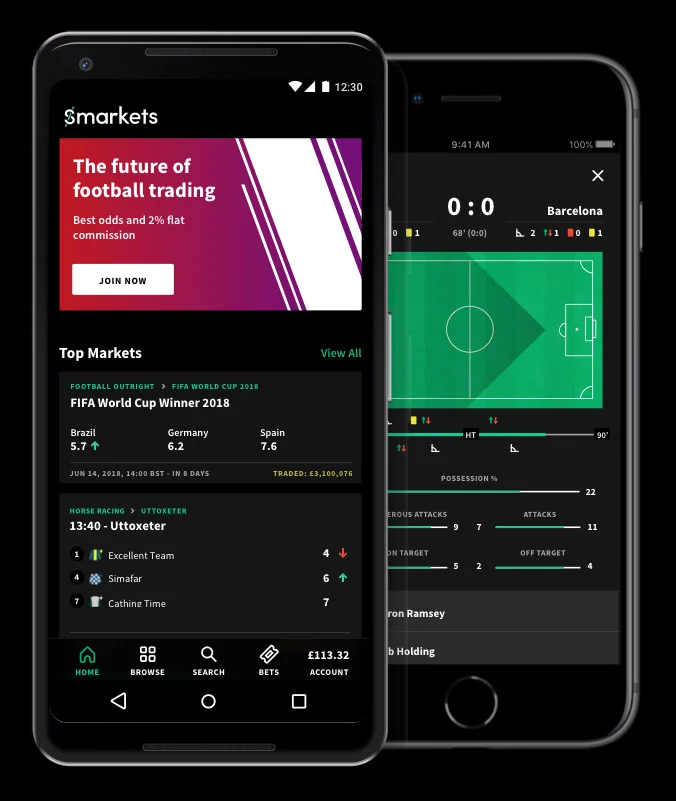
Trade Out is the headline feature and the one most users will rely on daily. It is Smarkets’ version of cashing out, but with the additional control that exchange betting allows. You can lock in a profit on a position that has moved in your favour, cut your losses on one that has not, or partially trade out to leave a reduced position running. It works in-play and pre-event, and on the app it is accessible with a couple of taps from the My Bets area. For anyone managing multiple open positions across a Saturday afternoon of football, it is essential.
The broader feature set covers everything an exchange user expects:
- In-play trading — real-time odds with fast execution, where the speed of app access over a browser genuinely counts.
- Live streaming — horse and greyhound racing streamed directly in the app, allowing you to watch and trade simultaneously.
- Push notifications — alerts for market changes, trade confirmations and price movements on markets you are watching.
- Biometric login — fingerprint or Face ID, plus two-factor authentication for an extra layer of security.
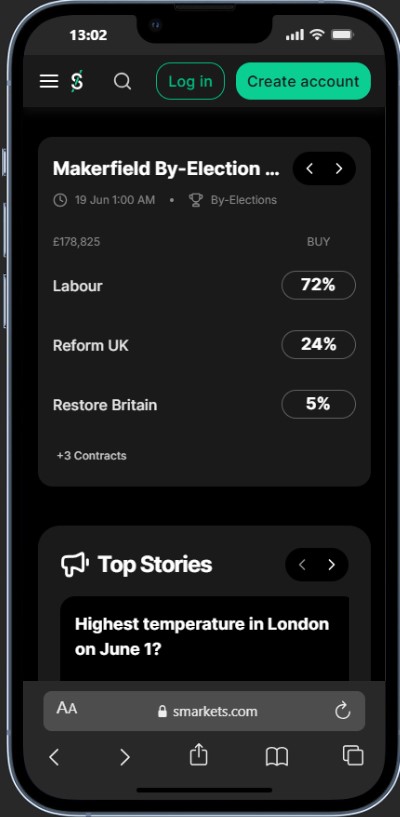
- Political and entertainment markets — not just sport; elections, TV specials and other event markets are all available.
The Matched Betting Hub deserves its own mention, because it is one of the things that sets Smarkets apart from Betfair for a specific and sizeable chunk of the user base. The hub includes a built-in lay calculator that lets you work out qualifying and free-bet lay stakes without switching to a separate tool. If you use OddsMonkey or a similar platform, Smarkets is already well integrated, and having the calculator inside the app means you can run the numbers and place the lay bet in the same session.
One honest limitation worth flagging is market depth visibility. On the desktop platform you can see the full order book with all available prices and the liquidity behind each one. On the app, you only see the best available price rather than the full depth. For casual exchange betting that is fine. For serious traders who want to see where the money sits across the book before placing an order, it is a genuine step down from desktop, and it is the main reason some users prefer to trade on a larger screen.
Here is the quick view of what works on the app versus what is better on desktop:
| Feature | App | Desktop |
|---|---|---|
| Back and lay betting | Full | Full |
| Trade Out | Full | Full |
| In-play trading | Full (fast via biometric login) | Full |
| Live streaming (racing) | Yes | Yes |
| Market depth / order book | Best price only | Full depth visible |
| Matched Betting Hub | Yes (built-in calculator) | Yes |
| Push notifications | Yes | No |
| Multi-market view | Limited | Better on wide screen |
The pattern is clear: the app handles the core exchange functions properly and adds mobile-specific benefits like biometric login, push alerts and on-the-go streaming. Where it falls short is the advanced trading view, which desktop simply does better because of screen space and full order-book visibility.
Next we compare the Smarkets mobile app directly against the mobile browser and the desktop experience, so you can judge whether installing it is worth it for how you trade.
Smarkets app vs mobile browser vs desktop
This comparison matters more for Smarkets than it does for a standard bookmaker, because the desktop platform genuinely does things the app cannot. On a traditional sportsbook, mobile and desktop are basically the same product on different screens. On an exchange where market depth, order books and multi-market trading are part of the experience, the platform you use shapes what you can see and how quickly you can act.
Here is how the three options stack up:
| Feature | App | Mobile browser | Desktop |
|---|---|---|---|
| Back and lay betting | Full | Full | Full |
| Trade Out | Full | Full | Full |
| Order book / market depth | Best price only | Best price only | Full depth |
| Multi-market trading | Limited | Limited | Full (wide screen) |
| Speed of access | Fastest (biometric login) | Slower (manual login) | Depends on setup |
| Push notifications | Yes | No | No |
| Live streaming (racing) | Yes | Yes | Yes |
| Matched Betting Hub | Yes | Yes | Yes |
| Works without install | No | Yes | Yes |
| Best for | On-the-go, in-play, quick trades | Occasional mobile use | Analysis, setup, serious trading |
The realistic picture is that most serious Smarkets users end up using more than one. Desktop is where you do the analysis, study the order book, set up positions across multiple markets and do the kind of careful pre-event trading that benefits from screen space and full visibility. The app is where you manage those positions when you are away from your desk, react to in-play price movements, watch a race stream, and Trade Out at the right moment.
That is not a criticism of the app. It is how exchange trading works in practice. The desktop gives you the full picture, the app gives you speed and access. Together they cover everything.
Where the mobile browser fits in is narrower. It does the same job as the app without the download, but it loses biometric login, push notifications and the smoother native feel. For a one-off bet or a quick check on a market, it works. For anyone trading regularly on mobile, the app is the better tool by a clear margin, and the strong iOS ratings reflect that.
The bottom line: if you trade on Smarkets with any regularity, install the app for mobile and keep the desktop platform for the heavy lifting. If you are a casual user who checks in once or twice a week, the mobile browser does the job and saves you the storage.
Smarkets mobile app design, navigation and performance
The design is one of the things Smarkets consistently gets right. The app uses a modern black, green and white colour scheme that is easy on the eyes and feels genuinely well-designed rather than just functional. Most reviews, professional and user alike, praise the interface as clean, slick and intuitive, and it is regularly cited as a step up from the Betfair Exchange app in terms of pure aesthetics. This is not a bolted-on mobile afterthought. It looks and feels like a product that was designed mobile-first.
Navigation runs through tabs at the bottom of the screen — markets, your bets, account — with sports accessible through a straightforward menu. The layout is thumb-friendly and moves you between sections without unnecessary taps. Placing a back or lay bet is quick, Trade Out is easily accessible from the My Bets area, and the overall flow from finding a market to confirming a bet is short and logical.
Where things get more complicated is performance, because the user feedback genuinely splits in two:
| What some users say | What other users say |
|---|---|
| Fast, slick, responsive | Lags and freezes under load |
| Smooth in-play trading | Slow to update during busy events |
| Reliable daily use | High battery drain |
| Better feel than Betfair | Occasionally crashes |
That is not cherry-picking. Both experiences are well-documented in the app-store reviews. The iOS version fares noticeably better, which the ratings reflect:
- iOS — 4.8 stars from 4,600+ reviews. Genuinely excellent.
- Android — Lower-rated, with more frequent complaints about stability and performance.
A few specific performance points worth knowing before you download:
- Battery usage is a recurring complaint. The Smarkets online betting app draws more power than you might expect, particularly during live events with streaming and in-play trading. If you are at the races for a full afternoon, bring a charger.
- In-play lag can surface during peak traffic on major events. For most markets it runs smoothly, but high-liquidity moments on big football matches or feature horse races are where the strain shows.
- Odds depth, as covered in the features section, is limited to best available price rather than the full order book. From a usability perspective this means the mobile experience is simpler but less informative than desktop.
The honest summary is that the app looks excellent and works well for most users most of the time, but it is not bulletproof under pressure, and the gap between iOS and Android performance is real. If you are on iOS, you are getting one of the best-rated betting apps in the UK market. If you are on Android, the experience is good but expect the odd rough edge, particularly on older hardware.
Smarkets app requirements and compatibility
The Smarkets app is not particularly demanding, but it does ask a little more of your device than a standard bookmaker app, mainly because of the real-time data it handles during in-play trading. Here is what you need:
| Requirement | Detail |
|---|---|
| iOS | Version 13.4 or later (iPhone 6s onwards) |
| Android | Modern device, recent OS version |
| Storage | Approximately 88.5 MB (iOS) |
| Connection | Wi-Fi or mobile data; stable connection for streaming and in-play |
| Supported regions | UK, Ireland, Malta |
| Eligibility | 18+ |
On iOS, the requirement of 13.4 or later means any iPhone from the 6s up will run it. The app works on iPad too, though the interface is designed around phone-sized screens and does not take full advantage of the extra space. If you primarily use a tablet, the desktop site in a browser may give you a better layout.
On Android, Smarkets does not publish a hard minimum OS version on the Play Store listing, but any reasonably current device should handle it without trouble. The performance complaints in the Android reviews tend to come from older hardware, so if your phone is more than a few years old, that is worth factoring in.
Connection quality matters more here than it does on a traditional sportsbook app. Placing a pre-event bet needs very little data, but in-play trading with live price updates, and especially racing streaming, both rely on a stable signal. If prices are moving and your connection drops for a few seconds, you can miss a Trade Out window. For serious in-play use, a strong Wi-Fi or 4G/5G signal is not optional.
Claiming COMMFREE on the Smarkets app
If you are registering a new Smarkets account through the app, you can claim the 0% commission welcome offer at sign-up. The process is the same as on the desktop platform — enter the promo code COMMFREE during registration, make a minimum £10 first deposit via debit card or instant banking, and your account runs at zero commission for the first 60 days.
The key terms in brief:
- 0% commission applies to all bets that settle within the 60-day window.
- Bets placed during the window but settling after it revert to the standard 2% rate.
- Deposits via Skrill, Neteller, PayPal and virtual cards (including Monzo) are excluded from the offer.
- New UK, Ireland and Malta customers only.
The alternative offer, a £20 cash refund on losses in your first week, is also available through the app if you prefer the safety net over the commission saving. You choose one or the other at sign-up.
Is the Smarkets app safe?
Yes, and the security picture is actually stronger than most competitors because Smarkets holds two licences rather than one. The platform is regulated by both the UK Gambling Commission and the Malta Gaming Authority, which means it meets the compliance standards of two separate jurisdictions. Your funds are protected, the exchange is independently audited, and the full suite of responsible gambling tools is in place.
Smarkets Limited has been operating since 2008, with offices in London and Los Angeles. This is not a new or untested operator — it has nearly two decades of track record in a heavily regulated space, and the dual licensing reflects a level of oversight that most traditional bookmakers do not carry.
On the app specifically, the security features go beyond the standard login:
- Biometric login — fingerprint or Face ID gets you into the Smarkets online betting app without typing a password, which is both faster and harder to compromise than a text password alone.
- Two-factor authentication — an additional layer on top of your password and biometrics, protecting your account even if your login details are exposed.
- SSL encryption — all data between the app and the Smarkets servers is encrypted in transit.
For responsible gambling, the app provides the same tools as the desktop platform:
- Deposit limits (daily, weekly, monthly)
- Session time limits and reality checks
- Cooling-off periods and self-exclusion
- GAMSTOP integration for UK-wide self-exclusion
The combination of dual licensing, an established operator, biometric access and 2FA makes the Smarkets mobile app one of the more secure betting apps available in the UK. The main security risk, as with any app holding real money, is on your side rather than theirs — so use a strong password, keep biometric login enabled, do not share your account details, and only ever download from the official app stores.
Smarkets app pros and cons
Here is the full picture in one place, covering everything from the features through to the honest limitations.
| Pros | Cons |
|---|---|
| 4.8-star iOS rating from 4,600+ reviews | Performance issues under load (lag, freezing) |
| Clean, modern design — widely praised | Android experience weaker than iOS |
| Full exchange: back, lay, Trade Out | Order book limited to best price only |
| Free live streaming for racing | Multi-market view restricted vs desktop |
| Built-in Matched Betting Hub with calculator | Higher battery drain than average |
| Biometric login + two-factor authentication | E-wallet deposits excluded from COMMFREE |
| Push notifications for trades and market changes | Occasional crashes reported on older devices |
| 0% commission for 60 days with COMMFREE | — |
| Dual licensed — UKGC and MGA | — |
| Same account and positions as desktop | — |
The Smarkets app genuinely does a lot well, and the iOS ratings back that up with real user numbers rather than marketing claims. The core exchange functionality works on mobile, the Matched Betting Hub is a unique differentiator, and the design sets a standard that most betting apps do not reach.
The cons are real but narrower in scope. They centre on performance under pressure, the Android gap, and the unavoidable trade-off between mobile convenience and desktop-grade trading visibility. For most users most of the time, the app runs smoothly. The rough edges show on older Android hardware, during peak traffic on major events, and for traders who need full order-book depth to make decisions.
Whether the cons matter to you depends on how you use Smarkets. A matched bettor placing lay bets a few times a week will barely notice them. A serious in-play trader managing multiple positions on a busy Saturday will feel the limitations more acutely, and will likely keep desktop as the primary tool with the app as the fast-access complement.
Smarkets app: the verdict
The Smarkets mobile app is one of the better betting apps in the UK market, and comfortably the best-looking exchange app available. It carries the full platform — back, lay, Trade Out, live streaming, matched betting tools — in a package that is genuinely well-designed and highly rated by thousands of real users.
It is not flawless. The performance splits in the reviews are real, Android lags behind iOS, the battery drain is noticeable on heavy days, and the lack of full order-book depth on mobile means desktop remains the better tool for serious pre-event trading. Those are honest trade-offs rather than dealbreakers, and they reflect the complexity of putting a real-time trading exchange on a phone screen rather than any lack of effort from Smarkets.
For most users, the decision is straightforward:
- Install it if you use Smarkets with any regularity, you trade in-play, you do matched betting on the go, or you want the racing streams and push notifications.
- Skip it if you only check Smarkets occasionally and the mobile browser does the job, or you trade exclusively on desktop and have no need for mobile access.
The strongest use case is the one most Smarkets users end up with naturally: desktop for analysis and setup, app for speed and access. The two complement each other, and the seamless position-sharing across devices means you never lose track of where you stand. That combination, paired with 2% commission and the COMMFREE zero-commission window for new users, is a genuinely strong package.
If you are new to Smarkets, download the app from the App Store or Google Play, register with the code COMMFREE for 0% commission on your first 60 days, and see how the exchange feels on mobile. If you are already trading on desktop, the Smarkets betting app is a free, well-built addition that earns its place on your home screen. As always, set your limits and only bet what you can afford to lose.
Frequently asked questions
Is the Smarkets app free to download?
Yes. The app is free on both the Apple App Store and Google Play Store. You only pay commission on net winnings when you trade, at the standard 2% rate, or 0% for your first 60 days if you register with the code COMMFREE.
What is the Smarkets app rated?
The iOS version carries a 4.8-star rating from over 4,600 reviews, which is one of the highest ratings of any UK betting app. The Android version is rated lower, with more frequent reports of performance issues on older devices.
Does the Smarkets app have Trade Out?
Yes. Trade Out is fully available on the app and works in-play and pre-event. You can lock in a profit, cut a loss or partially trade out of a position directly from the My Bets area.
Does the Smarkets app have live streaming?
Yes. The app streams UK and Irish horse and greyhound racing, allowing you to watch and trade in-play from the same screen. There is no streaming for other sports.
Can I see the full order book on the app?
No. The app displays the best available price rather than the full market depth. For full order-book visibility with all available prices and the liquidity behind each one, you need the desktop platform.
Is the Smarkets app safe?
Yes. Smarkets is dual-licensed by the UK Gambling Commission and the Malta Gaming Authority. The app adds biometric login and two-factor authentication on top of standard encryption, making it one of the more secure betting apps in the UK market.